Saturday, November 14, 2015

Charting Companion tells the story of your family

CHARTING COMPANION TELLS THE STORY OF YOUR FAMILY 
 
If you use a genealogy program such as Family Tree Maker, RootsMagic, Legacy, PAF, Family Historian or other, you need Charting Companion to display your family tree in charts. Charting Companion tells the story of your family in glorious color, with beautiful and unique charts.

Fan chart
 
Charting Companion has some great features to show off your research:
  • The new Fractal tree
  • The new Dandelion chart
  • The unique Descendant Fan chart
  • The Trellis "chart with everybody on it"
  • Publish in HTML format for sharing on the Web
  • Dozens of attractive, pre-selected color palettes
  • Editing charts by moving boxes
  • Windows 10 compatible
  • ...and much more
Dandelion chart
 
Just click here to see all the attractive charts that Charting Companion can do for you. See happy family reunions where our charts are on display.
 
 
Charting Companion charts will make you a hit with your relatives, and the star of your next family reunion.
Interesting Image
Pierre Clouthier
President, Progeny Genealogy 
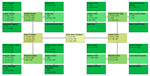
Fractal Tree
Fractal Tree

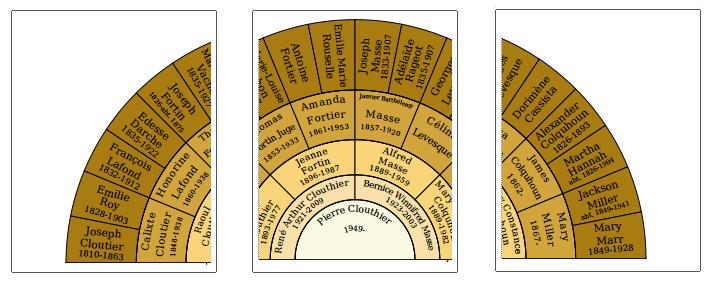
Tiling huge Fan charts

PRINT HUGE FAN CHARTS
 
Did you know that you can print large Fan charts by tiling the chart over multiple pages? 

Charting Companion enables you to create Ancestor and Descendant Fan charts of any size by specifying the radius. If the size of the chart is greater than the paper in your printer, Charting Companion will break it up into multiple pages.

Tiled Fan Chart

Tiled Fan Chart

The cropping and alignment marks make it a breeze to assemble the final chart seamlessly. 
 The Descendant Fan chart includes a "Smoothing Threshold" option to make the font sizes more uniform. 

Got a large chart? Send us a picture and we'll feature it in our Photo Gallery


We are honored to help you tell the story of your family.

Interesting Image

Pierre Clouthier

President, Progeny Genealogy


PS: Please forward this to friends who want to tell the story of their family.

Charts in Rich Text Format (RTF) for direct word processor compatibility


CHARTING COMPANION NOW CREATES CHARTS IN RICH TEXT FORMAT FOR DIRECT WORD PROCESSOR COMPATIBILITY
 
"You're not sophisticated," I teased my sweet, gentle wife.

"That's why I married you," she promptly replied.

I tried to regain my aplomb: "Well, I'm sophisticated".

"That's why you married me," she zinged.

Do you ever imagine what life was like in the past? What were the playful exchanges between family members? Was humor like it is today, or has it evolved?

Family history casts a vision upon the unbroken chain of our ancestors. Charts and books about the past inspire your family to appreciate the hardships and sacrifices experienced by your kin.

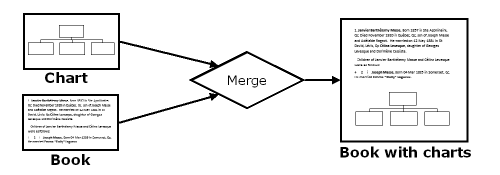
This month we announce a neat new feature of our Charting Companion program - Ancestor and Descendant charts that can be saved as word processing files in "Rich Text Format" (RTF). RTF is directly compatible with most word processors. RTF enables you to easily merge charts into an Ancestor or Descendant book. What a great way to enhance a narrative or clarify a bloodline!
Merging charts and books
Merging charts into a book
 
 You can assemble multiple charts into a volume for convenient publishing.

Get Charting Companion today for $34.95 download, $39.95 CD-ROM. Tell the glorious story of your family.
Pierre Clouthier
Pierre Clouthier
President, Progeny Genealogy
 
PS: Please forward this to friends who want to tell the story of their family.
 

Wednesday, September 9, 2015

Charting Companion gets new tabbed dialogs ("Property Sheets")


Software developers often use third-party software "packages" or libraries, to perform common tasks and avoid the time and expense of re-inventing the wheel. For example, reading and displaying images (JPG, PNG), or creating a PDF file, etc. are complex tasks that require much time to implement. Much better to call upon a firm whose specialty it is. These software packages don't come cheap: license fees typically run into the thousands. But it's still less expensive than developing it from scratch.

Third-party software can become a liability, however, if the developer loses interest or goes out of business.

Property sheet, aka Tabbed Dialog
We bought a license to a "tabbed dialog" library called SftTabs, back in 1996. Tabbed Dialogs, also known as Property Sheets, were introduced with Windows 95, but in those days a lot of customers were still using Windows 3.1, and we wanted to remain backwards compatible. So we used this third-party library to implement all our Options dialogs.
A few weeks ago, we decided we wanted to verify that our backups were complete. We installed all our tools on a "virgin" computer,  and restored all our source code from the backups. This is known as a disaster recovery simulation.

Everything went fine, except for the SftTabs library. Their automatic license manager prevented SftTabs from being installed. Since the recovery computer was only going to be used this one time, I sent an email asking for an exception to enable us to compile and test our code.

The days went by, I got no response. I sent another email. I left a phone message. Nothing.

Not the support I expect for a $400 piece of software.

After a couple of weeks, I resigned myself to the fact that the SftTabs company either did not have the resources or interest in supporting their product. There was no mention of Windows 10 compatibility on their Website, another sign that the product is not being maintained. I had to find an alternative before we were in a real jam.

I proceeded to learn about Property Sheets, which are native to Windows, and come at no additional cost. Fortunately I was able to convert all our dialogs in two weeks of concentrated effort. I am now pleased to say that Charting Companion 6.0.24 is completely converted to Property Sheet-style dialogs. The dialogs and fonts look much better, the code is simpler, and as a bonus we have the foundation for Wizard-style dialogs, which will make the program easier to use.

Talk about turning a lemon into lemonade!